
S&box Cheat
Online
Free S&box cheat with aim assistance, triggerbot, ESP, radar, world visuals, movement tools and custom hotkeys.
MAKE IT YOURS
More control over every scene.
Included with your Scooby account
Scooby S&box is online and free for every authenticated free-key or paid account. Open S&box in the loader, locate the game if needed, and launch. The loader downloads and verifies the matching runtime files for you. No additional S&box key is required.
Combat
- Lock-on and silent aim: switch aim modes from the Legit tab, with adjustable FOV and range. Lock-on includes smoothness controls.
- Multi-hitbox selection: head, neck, chest, stomach, pelvis, arms and legs. Near selects the chosen hitbox closest to the crosshair.
- Target controls: include players or NPCs, require visibility, ignore teammates and keep the current target.
- Break aim: stop on manual mouse movement, with an adjustable threshold.
- Triggerbot: fire when the crosshair hits a valid target, with a configurable delay and its own activation key.
- Aim overlays: FOV circle, target hitbox dot and target line, with adjustable colors, opacity and size.
- Activation: press-to-bind aim and trigger keys with Hold, Toggle or Always modes.
Players, NPCs and held weapons
- Separate ESP styles: configure players, NPCs and your own model, with distance limits and an all-skinned-models fallback.
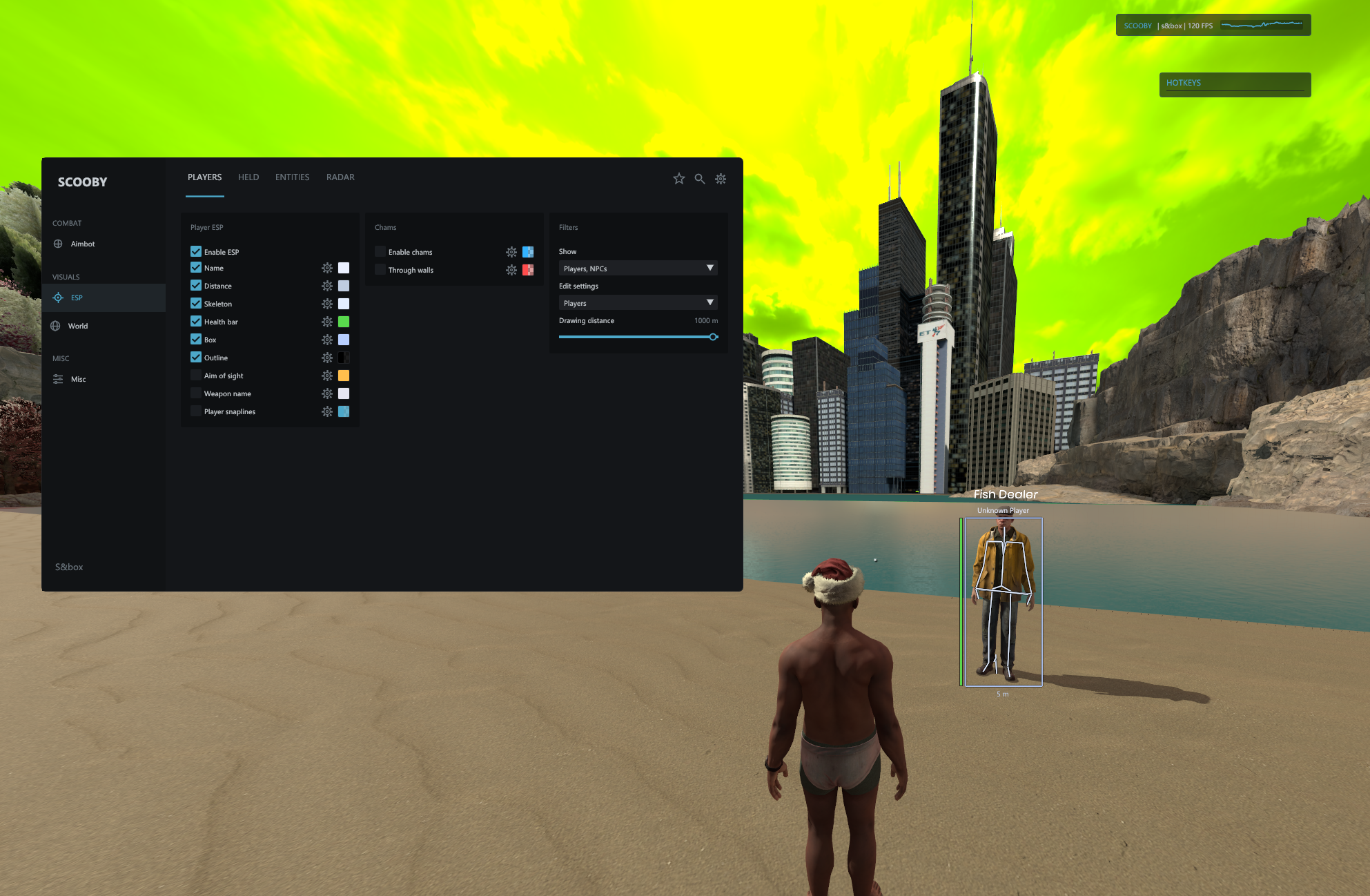
- Player information: boxes, skeletons, names, distance labels, health bars and health gradients.
- Aim-of-sight lines: show the direction a player is facing; adjust line length, width and color.
- Weapon names: show the current held weapon, with text size and position controls.
- Chams and snaplines: visible and through-wall highlights, outlines and configurable line origins.
- Held visuals: separate arms and weapon chams with individual colors.
Items, entities and radar
- Item and entity ESP: names, boxes, distances, chams and snaplines, with independent styling.
- Filters and selection: match names or components, limit range and select individual entities from the entity list.
- Draggable radar: player and NPC markers, teammate colors, optional names, rotation, rings, crosshair and outline.
- Radar appearance: adjust size, range, marker size, shape, background and colors.
World visuals
- Night mode: choose the tint and strength.
- Sky controls: custom sky tint and brightness.
- Fog controls: remove fog or apply a custom fog tint.
Movement and camera
- Movement: bunny hop and auto strafe.
- Camera: FOV override and third person with distance, shoulder and height offsets.
- Viewmodel: weapon/model FOV adjustment and forward, sideways and vertical offsets, plus reset controls.
- Crosshair: custom size and color.
Interface and profiles
- Custom appearance: accent colors and color pickers with alpha controls.
- UI scaling: a 25–200% slider, 25%, 50%, 75%, 100%, 125%, 150% and 200% presets, plus automatic resolution scaling.
- Feature hotkeys: Hold, Toggle and Always modes, an assigned-key list and a clear-all button.
- Search and favorites: find features quickly and keep frequently used options together.
- Overlays: draggable watermark with an inline FPS graph and an assigned-hotkey display.
- Saved configs: create, save and load named profiles; open the config directory directly.
Getting started
- Download the Scooby Loader and sign in with your existing free key or paid account.
- Close S&box, select its card in the loader, then choose Launch S&Box.
- Use Locate game if the loader cannot find your Steam install.
- Press F1 or Insert to open the menu, then set your preferred menu key and save a config.
Game-mode support
Available data and controls vary by game mode. ESP displays information exposed by the active scene. Silent aim currently supports first-person weapons using the standard combat-weapon firing path; custom weapons and third-person aiming may not support it.